Roccat Vulcan TKL Pro Review
At the speed of light, Roccat's new TKL keyboard is masterful.
As a PC gamer, I’m always on the lookout for new hardware, as any PC player will tell you, your battlestation is never finished. Enter Roccat with their new Vulcan keyboard line, and more specifically in this case, the Roccat Vulcan TKL Pro. I’m a big fan of smaller form factor keyboards, and a TKL, or ‘tenkeyless’ layout is perfect for me. I have no need for a numpad, but god forbid I lose my arrow keys.
The Vulcan TKL Pro is built on an extremely solid, aircraft-grade aluminium base, with barely any noticeable flex. The underside is hard plastic, with easy access to all the screws by the looks of things, no need to remove any rubber feet to take this thing apart if you needed to. Speaking of rubber feet, you have three wide feet at the front of the chassis, with two on the flippable feet at the back, a pair visible when the angled feet are down, and a pair when the feet are up. So at whichever angle you like your keyboard, this thing isn’t going to be slipping around.
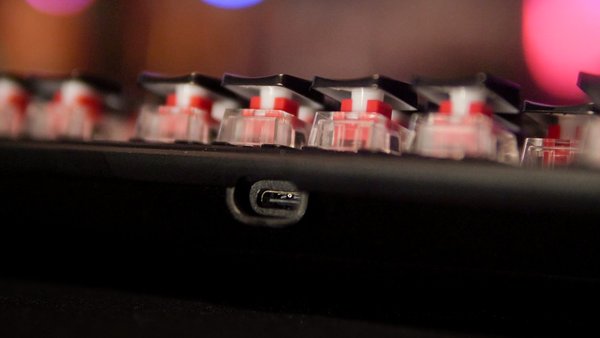
Connectivity is via a removable USB type C connector, which is slightly offset to the left of the keyboard- not sure whether that was a conscious design decision, but it’s nice to see, since some manufacturers are still sticking to the now almost archaic micro USB. The cable itself is braided, just shy of two metres long, has a nice Velcro cable tie built in for when you need to keep things tidy, and the type A connector features a keyboard icon, so you know what you’re unplugging when fumbling behind your PC. The keycaps are a low profile double shot smooth plastic, which could lead to an oily, shiny look after constant use, and are slightly contoured so that your fingertips are drawn into the centre of the keycap. They use a beautifully clean typeface (no gamer-y fonts here), and the secondary functions of particular keys, though not as bright as their default counterparts, are still mildly translucent, meaning you can still see where your punctuation and print screen controls are in the dark. There are also the usual small notches on thel F and J home keys, but also on the W, as this is a gaming keyboard after all.
[Cont.]
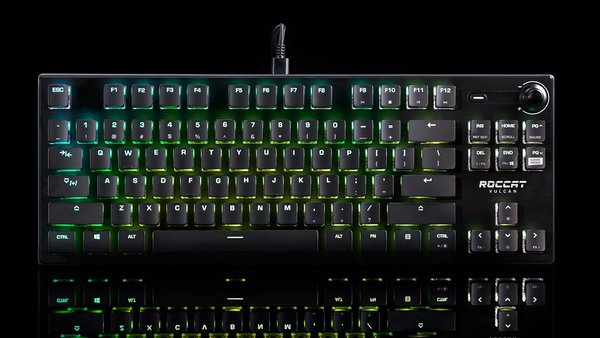
Of course, there is RGB involved. The lighting is per-key, and thanks to the open nature of the chassis, it is extremely bright, even when against the black aluminium base. You can switch between some simple lighting profiles with the FN and arrow keys out of the box, though you get much more customisation options through Roccat’s Swarm software. You can recolour individual keys, create entire profiles, even add certain animation effects to set keys, so your WASD keys could remain solid while the rest of the board breathes, which is a nice touch.
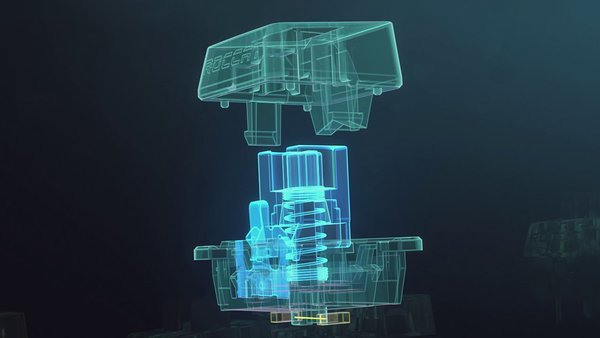
The switches in play on the Vulcan TKL Pro are Roccat’s own Titan Switch Optical. A linear switch (so no tactile bump or loud clicks), that have a 1.4mm actuation distance, so they’re pretty quick on their feet. Plus, thanks them being optical switches (meaning it’s activated by the switch blocking a beam of light to register press), each key has a lifespan of 100 million keystrokes, which is (on average) double that of a normal mechanical switch. The keycaps are removable, and the Titan Switch Optical does use a usual MX stem, so if you wanted to swap out the keycaps, you are absolutely able to. It does have a standard bottom row if you wanted to do this which is nice, but because the caps are quite thin, be careful when removing them, as a) they could go flying, and b) you could break them if you’re a little too rough. Typing and gaming on this keyboard feels fantastic. The switches have nice and smooth, consistent travel, and the shorter actuation distance means that when gaming, your key presses really do feel almost instantaneous. However, because you have more visible gap between the caps, the spacing feels a little wider than what I’m used to, so I did find myself getting my fingers wedged between the keycaps at times.
Even with keycaps so thin, Roccat have really made an effort to stabilise the larger keys properly, and they’ve succeeded, as there’s only a minimal amount of wobble on them. A firm shake of the keyboard and you don’t hear any keycap rattle, which is awesome. Also on the board is a volume wheel with great tactility, and a mute button next to it- but there are no dedicated media controls. They’ve been relegated to a function layer on the F keys, but for a TKL form factor, this isn’t a huge surprise. There are also no discrete indicators for Caps Lock, Scroll Lock, or the included Game Mode functionality. Instead, the key illuminates in white to show that it’s active. You don’t have any control of this ‘active’ colour in software, so if you like to have your keyboard illuminated in solid white (like I do), you’re not going to know whether caps lock etc is actually on, which is a problem- provided you want that pure white aesthetic.
[Cont.]
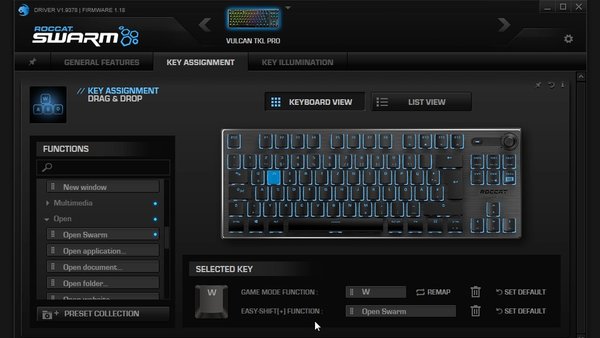
The majority of the keys are reprogrammable in the Swarm software when in gaming mode, and a minority of those keys have an extra layer of re-programmability atop that with Roccat’s ‘easy shift’ system. It basically turns the caps lock key into an extra shift key, which took me an age to get working, as it wasn’t overly clear that easy shift only works when in gaming mode. But, it’s still pretty cool nonetheless, and I’m sure the MMO lot would probably get a lot of use out of two layers of customisation. However, one key you can’t customise is the mute button I mentioned earlier. Though it is kept pretty neutral in its design and so doesn’t feature a clear ‘mute’ icon, it can only do just that. You can’t map that to say, your mute or deafen in Discord, or move one of the media functions like play/ pause to it. Or if you’re a really salty gamer, you can’t make it your automatic Alt+F4 button, which is honestly quite a shame. Perhaps this is something they could add in a software update, unless it’s somehow hard-bound to that key.
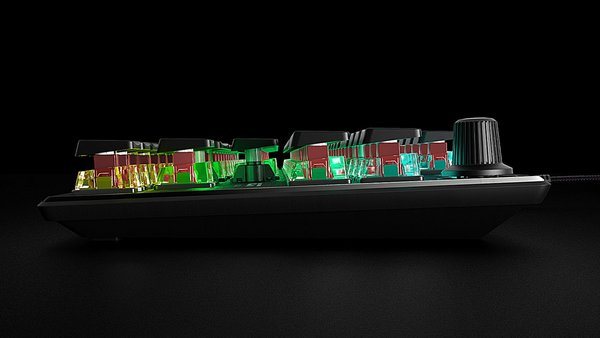
One more thing. The ‘low profile’ nature of this keyboard is almost an illusion. Where the likes of the G915 from Logitech and the Cooler Master SK631 are more genuine low-profile keyboards, using low-profile mechanical switches, the Vulcan TKL Pro uses more standard height switches, but with low-profile caps. It’s not like they were going for something genuinely thin here, but if you’re looking at this thinking it’s going to be a chiclet-style mechanical keyboard, you’ve come to the wrong place. However, it does still have a slightly lower maximum height than a usual TKL gaming keyboard, so it’s not like the ‘low profile’ aesthetic is an outright fabrication.
In conclusion, I really like the Vulcan Pro TKL. As someone who’s been through a variety of mechanical keyboards over the last five or so years, this is one of the best feeling, most robust, and best looking keyboards I’ve used. Though it’s not entirely perfect, and I think the Swarm software could use a little work, the Vulcan TKL Pro is an extremely solid option for any gamer wanting a lightning fast upper-hand out there on the battlefield.
At a pretty significant £149.99, it’s definitely not a cheap keyboard, but I do feel like you get what you pay for.
Thank you to Roccat for sending through a review unit! You can find out more about the Vulcan TKL Pro here.