Nintendo Switch Review: 6 Ups & 4 Downs
The most ambitious and unique system of our time... with some key flaws.

Arriving amidst a sea of mixed coverage and hands-on reactions, Nintendo's portable home console hybrid is easily their most talked-about system since the Wii.
Mostly because the Wii U had about as much impact as a wayward mouse fart, but there you go.
Thankfully, in learning all sorts of lessons from the past 30 years, Nintendo have rolled together ever major feature they first innovated across each subsequent generation, into what could eventually be one of the best consoles of all time.
Yes, it lacks the rendering punch necessary to get something Call of Duty running smoothly and the only third-party games you can play are those from many an awesome indie developer, but the foundations are here for an awesome future of non-stop play, taking the same system with you on the go, before docking it and continuing on the big screen.
What works and what doesn't? Well...
Ups
6. Going Portable To Big Screen And Back Again Is Magic

It's been the system's biggest boon since the press first went hands-on last year - being the Switch's entire processing unit is housed inside its tablet interface, carrying it with you and 'gaming on the go' before slotting it back in the charging dock is a seamless process.
It takes literally just over a second for the feed to transfer between handheld mode and your TV display, re-rendering whatever you're playing from 720p on the tablet, to full 1080p (or 900p for Zelda).
It would be simple to say that "All the system is doing" is tantamount to plugging in an HDMI cable, but in swapping resolutions and letting you detach/reattach the controllers at the same time, lies one of the most satisfyingly tactile aspects of factoring the Nintendo Switch into your life.
5. Instant Local Co-Op Faster Than Any Other System

It is true that there aren't a huge amount of head-turners amongst the Switch's launch library, but what is out there is still pretty damn special.
Outside of Zelda, there are a number of awesome local multiplayer games, all of which make great use of just handing one 'half' of what would be a full Switch controller - comprised of two Joy-Cons - to a friend.

An incredibly innovative idea, Sony actually dove into split controllers too, back in 2011/12, yet the patent they filed for never saw the light of day. In the Switch's case, there is a downside in just how small one Joy-Con is, but the instant-access of popping any game on, the system recognising the pads are now turned sideways and letting you get going feels fantastically progressive, if not revolutionary, given where we could go from here.
4. Screen Is Gorgeous, UI Simple & Effective
The Switch's portable mode makes full use of a gorgeous 1280x720 HD screen, running all games at a solid 720p resolution when un-docked, really highlighting how something like the neon glow of Fast RMX or the breathtaking vistas of Zelda can look stunning, no matter where you're taking them in.
The console's UI itself features a much more easy to use look than the literally crowded (fully of Mii avatars) backdrop of the Wii U, centring around a clean tiled interface hosuing a number of distinct, key functions.
You've got your game tiles, and below, smaller icons for online news, the eShop storefront, an album for the console's one-button screenshots, controller configurations (used for telling the system whether you're going back to playing solo or want to re-register the Joy-Cons as being on their sides), system settings and sleep mode.
There are just a fraction of settings even in the main system menu by comparison to other systems, almost a feeling like Nintendo are hand-waving away the minutiae of optional HDR, myriad display, controller and customisation options or other four-step toggles tucked away deep inside the PS4 and Xbox One.
The Switch is all about the games. How high a resolution can your TV handle? Do you want to tie some social media accounts in or register an Amiibo?
Good. Let's play.
3. A Smart Way Around Charging Batteries

Again, the whole Switch is housed inside its tablet, and as the Joy-Cons can be detached, it means Nintendo had to think of a way to get three separate items working in unison.
To do so, the Switch's main screen holds the most power, and can be charged either from the wall directly into a USB-C port on the bottom, or when sat in the dock. The two Joy-Cons however, draw their power from the Switch itself (unless you purchase a separate charging accessory), meaning you need to either leave them attached to the Switch all in the dock overnight, or they can pull power and charge when in portable mode.
It may seem slightly confusing, but at any given time, one of the two 'halves' of the console will be charging, either the tablet or the controllers, meaning although you do need to charge the Switch regularly, all of its components are always ready to go.
2. No Install Times, Patches Happen In The Background

Oh man, this. All day long, f'ing THIS.
How many times have you bought a new game on PS4 or Xbox One, only to sit for literally HOURS as it downloads every last possible patch, or takes a good 20 minutes installing, checking for updates, doing its tie up or slicking its hair back?
If there's one specific thing the PS4 and Xbox One are both getting insanely wrong, it's how much we have to treat what's supposed to be a 'put your game in and go!' console experience, like a PC.
Not the Nintendo Switch, though, hell no.
Games come on cartridges, load instantly (literal seconds) and any patches I've needed to apply (so far) happen in the background, with you barely noticing - a stark contrast to the juddering likes of the competition as they juggle whatever you want to play with what they want to modify.
1. Visit Other Eshops Around The World
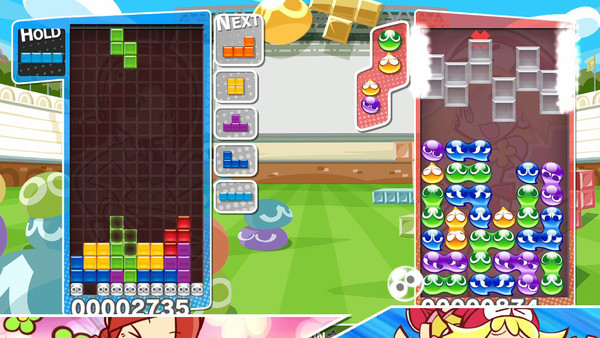
For whatever reason, Nintendo have relaxed all their global restrictions on playing games from other regions. Where most consoles would require you jump through a number of hoops to gain access to another continent's content, on the Switch it's as easy as creating another account, setting your Region as 'Japan' (or wherever) and browsing accordingly.
Many Japanese games already come fully localised in English too, showing many developers have planned ahead, knowing this was going to happen.
Either way, although to purchase games you'd have to procure a Japanese/region-appropriate gift card, you can still download all the free demos you like, immediately increasing the number of games to play.
Downs
4. Battery Life In Portable Mode Can Be Tiny

There's no getting around it: Because the Switch is the world's first attempt to squeeze a home console experience onto a tiny tablet - even including a cooling fan to offset the heat if need be - it still can't handle something like Zelda for longer than around 2.5 hours un-docked.
Now, this battery life can be extended to twice and almost thrice the amount by playing games that don't ask the Switch to render anywhere near as much as Nintendo's new magnum opus. Zelda is clearly a gargantuan computational powerhouse, but the likes of the ace Snipperclips, Shovel Knight or Fast RMX are not.
As such, you can mitigate this downer by rationing out your portable time on Nintendo's finest game in years, but when that's probably why you bought the system anyway, it's not a great compromise.
3. Joy Con De-Sync Issues

How this made it through testing I'll never know, but the left Joy-Con (used for movement in single-player games and for... everything, if given to another player) very frequently loses track of the Switch itself when docked.
Portable mode is totally fine, but if you've got the Switch on your TV and are sitting across the room, even resting your fingers over the shoulder buttons will block the 'eyesight' the Joy-Con needs to 'see' the Switch, yet this doesn't effect the right Joy-Con whatsoever.
It's not just fingers either - doing anything other than holding the front of the pad 'towards' the system can result in the same issue, as can placing any objects on a table, having a wifi modem nearby and so on.
Worse still, when the Joy-Con is losing connection, it won't tell you, but will carry on whatever the last command was, making many games unplayable, costing you a valuable attempt at any precision-based section of gameplay if your character wanders off the level to their death, or you crash your vehicle last minute.
The hope is that Nintendo will patch this (somehow), but so far all they've done is acknowledge it's an issue, before asking players to stay away from all potential sources of interference, including, weirdly, an aquarium.
But hey, if you live in a shed and play about a metre from the TV, you're gonna have a blast.
2. TINY Internal Memory & Reliance On External SD Cards

The Switch may be advertised as having 32GB, but as with all storage media, thanks to the system's innards calculating bytes differently and accounting for 7GB's worth of that sprightly OS, there's actually just 25GB left.
To remedy this (with additional cost), the Switch does include support for SD cards up to 2TB (though they haven't been released yet), meaning you can expand the system's memory and load games from an attached SD card. Point being though, in a world of digital media where Nintendo themselves are offering many sizeable games on their own eShop, it's disappointing to know you'd have to shell out more just to install them.
1. Single Joy-Cons Can Feel VERY Cramped
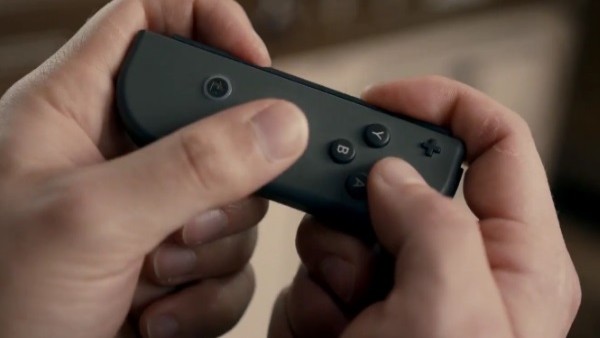
I'll try to refrain from 'tiny hands Donald Trump' jokes, but the fact remains - despite segmenting the Joy-Cons to play with a friend being an instantly cool thing to do, actually using them if your paws are anything larger than a child's, is very cumbersome.
Attaching the wrist straps does mean that the tiny recessed 'shoulder buttons' are now easier to use, but being a sideways Joy-Con will now have what used to be its own shoulder buttons right on the side (seen above), it's almost impossible to use ZL and ZR without accidentally hitting them.
Atop that, the joystick and face buttons are very close together, as you're literally using a controller designed to be one half of a larger configuration, on its side. Props to Nintendo for even thinking of this, it certainly is the fastest way to boot up a game and hop into something with a friend, but if you're anyone other than a tangerine-faced chimp with a penchant for nuclear destruction, they're going to be a tad hard to use. Sad!*
*Sorry.
--
Did you pick up a Switch? Are you still on the fence? Let us know in the comments!