8 Default Settings In Video Games That Drove You MAD
The default settings that made you lose your damn mind.

There probably isn't a gamer among us who hasn't started playing a video game and immediately felt like something was totally... off.
Perhaps it took you a minute to realise what was up, but it gave you some instantly irritated vibes right out of the gate, until you went into the game's menu and did some tinkering around.
It goes without saying that most video games should boot up with default settings designed to appeal to the vast majority of players - though to the same token, players should also be able to tweak things to their needs and preferences as soon as humanly possible.
And over the years, these are the typically default settings which have continued to drive many - even most - players mad. From basic accessibility oversights to simple preferences, specific gameplay conditions, and everything else in-between, games as a whole need to ensure these default options aren't the norm.
Or better yet, just launch the game straight into the options menu before anything else, which while hardly the sexiest way to kick off the latest AAA hotness, at least ensures everyone can lock down their preferred settings before starting the adventure...
8. Subtitles Off

In the overwhelming majority of video games, subtitles aren't enabled by default, and while for players who don't need subtitles for comprehension it simply requires them to enter the game's menu and turn them on, this becomes decidedly more problematic for players who do require them.
Because of course, it's still maddeningly common for games to boot with a dialogue-filled cinematic before we reach the game menu, ensuring those unable to hear the dialogue are simply left out.
But even beyond the wider accessibility argument, subtitles are being used by a growing number of people across gaming and TV, with a 2019 Ubisoft study indicating that more than half of players would turn subtitles on if they were off by default.
And so, as subtitle users are now in the majority, why aren't all games turning subtitles on from the moment a game boots?
It's surely far less bothersome for those who don't want subtitles on to turn them off once they reach the game menu, than the other way around.
7. Vita Chambers Enabled - BioShock

Much loved though BioShock is, there's one aspect of its game design which has remained polarising ever since launch - the inclusion of Vita Chambers.
Whenever the player dies in BioShock, they'll be instantly respawned in the nearest life-restoring Vita Chamber, allowing them to quickly continue playing without any cost to their resources.
Because the Vita Chambers can be used an unlimited number of times and enemy health stays the same upon each respawn, it effectively allows players to brute-force their way through tricky combat encounters.
This in turn trivialises any and all sense of threat throughout the game.
But 2K did thoughtfully include a setting to turn Vita Chambers off in the game's menu, as makes for a decidedly more tense and satisfying experience.
Ultimately this feels like the way that BioShock was actually intended to be played, with the Vita Chambers basically being a togglable accessibility feature which players should've been notified of at the start of the game.
6. Inverted Axis

Now to be totally fair, there are many players who prefer an inverted control scheme, but it's also reasonable to suggest that the majority still defer to the "regular" style, where the camera will move in the same direction that you push the analog stick.
But there are still plenty of games which bafflingly offer up an inverted axis as the default option, no matter how divisive it is.
This was especially prevalent on the Nintendo 64, where GoldenEye 007 infamously launched with inverted Y-axis controls, and it was far from the only example.
It's a sure-fire way to instantly confuse vast swaths of players, though thankfully isn't too common nowadays.
Many games, such as the Halo franchise, instead offer up a brief calibration tutorial at the start of each game, where you'll be asked to "look up," and which ever direction you move the analog stick will determine your control scheme for the game's remainder.
All games should absolutely have the option to invert their X and Y axis, though non-inverted should also be the default in almost all cases.
5. Auto Action Button OFF - Resident Evil 6
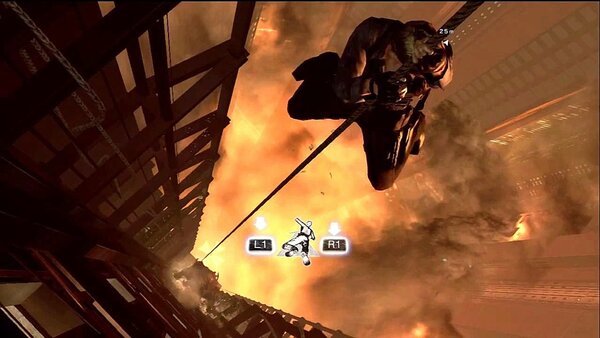
Even many of the folk who unabashedly love the wildly contested Resident Evil 6 will admit that the quick time events (QTEs) are by far the worst part of the game.
Though RE6 wasn't the first game in the series to feature QTEs, it was the first to deploy them so pervasively, aggressively shoehorning them into the middle of gameplay sequences, often with razor-thin timing windows where failure results in an unforgiving instant death.
Many fans found their inclusion in the game obnoxious and actively detrimental to the overall experience, though RE6's menu did thankfully include the "auto action button" feature, allowing the most perilous insta-kill QTEs to be automatically completed without fear of failure.
Given that RE6 is a big, dumb rollercoaster ride of a game, auto-completing QTEs should probably have been the default setting, rather than throwing momentum-stifling skill checks at the player throughout a game that's already far too long.
Sadly, though, many players didn't learn about this feature until after they'd slogged through the game in its entirety.
4. Motion Blur & Chromatic Aberration

Developers are constantly striving to make their games look more "realistic" and "cinematic," to make it appear as though the game's camera contains all the physical artefacts and imperfections you'd expect from a real camera lens.
And so, over the last 15-or-so years, there's been a serious uptick in default post-processing effects like motion blur and chromatic aberration, no matter that many, many gamers absolutely hate them.
Though some will concede that motion blur can help smooth out an image at lower framerates like 30fps, it's more widely loathed at 60fps and above, where it feels like an ugly visual smear that simply lets players see less of the game world in any moment.
And then there's chromatic aberration - an attempt to replicate the colour fringing effect which is present in real camera lenses.
However, many find it visually unappealing and for others it's a genuine accessibility issue, where the fringing can cause eye strain and headaches.
Ultimately motion blur and chromatic aberration are enabled in most games by default, under the guise of delivering a richer, more movie-like image.
And yet, these are video games - straining to find parity with the physical properties of film feels like a misstep. Otherwise we'd all be stuck playing games at 23.976fps, right?
3. Battle Chatter - Xenoblade Chronicles 2
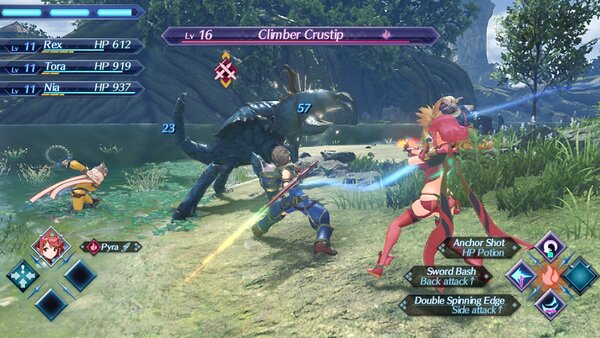
Battle chatter isn't an inherently bad thing in video games, but hoo boy, it sure becomes grating when developers haven't sufficiently stocked their game with a varied collection of soundbytes, ensuring you're forced to listen to the same inane, sanity-eroding comments over and over again during a single brief fight.
And there's perhaps no greater offender of this than Xenoblade Chronicles 2, which by default will have your party members drop the same tired quips repeatedly during battles, to the extent that you might even consider it too annoying to keep playing the game.
Except, there is a solution - in the game's audio options, you can actually mute battle narration, as instantly makes the game's combat so, so much more enjoyable.
Clearly, given the great many who've been aggravated by the agonisingly repetitive battle chatter throughout the franchise, it should've been turned off by default.
But of course, no developer wants to discourage you from listening to the voiceover work they spent a pretty penny on. All the same, it's maddening that the QA testing phase didn't flag how irritating the limited chit-chat is.
2. Yellow Paint
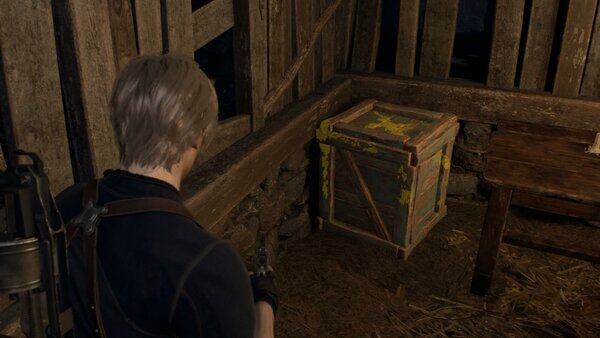
One of the more fascinating gaming discourses of recent times has been the debate about yellow paint, which developers often use to nudge players in the right direction - or, as many will argue, excessively handhold them.
And indeed, in 2025 it's quite the immersion breaker to see yellow paint slapped all over the shop in the middle of a survival horror game like Resident Evil 4.
Even if you're not fussed about having the path forward neon-signposted, you have to ask yourself - who the hell did all this painting?
Now, there's nothing wrong with yellow paint as an accessibility feature for players who need it, but it should absolutely be something which players are asked about upon booting a game for the first time.
Hell, in many games there's no option at all to turn it off, but even in the ones that do offer a yellow paint toggle - like, most recently, Star Wars Outlaws - it's typically activated by default.
It instantly undercuts a game's atmosphere to have this distractingly "game-y" feature enabled from the moment you start up.
1. Trails On - Grand Theft Auto: Vice City
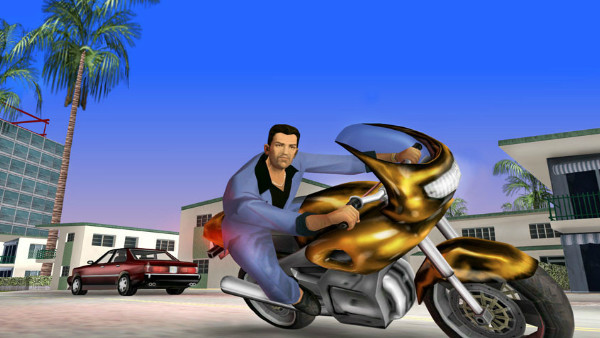
A subtle yet defining aspect of the original 3D Grand Theft Auto trilogy's aesthetic is the default inclusion of "trails."
Trails are a visual effect where frames of gameplay overlap, creating a strangely hazy look, where previous frames are briefly visible on the screen when moving around.
It's an artistic choice that's proven divisive ever since the release of GTA III, some seeing it as a welcome atmospheric flourish, while others decry it for looking ugly and garish.
After all, it's a tad baffling that any developer would intentionally make an image muddier and open themselves up to easy criticism.
Moreover, it's odd that they'd turn this feature on by default, rather than making it something which tinkerers can activate in the menu and dial in to their taste.
Instead, those who find the visual artefacting repugnant are the ones who have to suffer through it on boot and then turn trails off in the game menu.